WordPress is popular for creating user-friendly and customizable websites, but it’s not enough on its own to attract visitors. SEO for WordPress is also important for better search rankings and user experience. This guide will help improve your site’s search engine visibility. We will give you several SEO wordpress tips. When you make your website easy to understand for search engines, we call it technical SEO. It’s important for helping a website show up higher in search results.
You should check: The Basic SEO Tutorial – Making SEO Easy For Everyone
How to Improve Technical SEO?
An SEO optimized wordpress website requires making changes to a website’s server to make it easier for search engines to find and rank. You gotta work on title tags, HTTP responses, XML sitemaps, 301 redirects, and metadata. Unlike on-page SEO, you don’t create content, do keyword research or build links in technical SEO. When it comes to using WordPress, technical SEO makes sure that your site is well-organized and is free of errors.
Importance of WordPress Technical SEO Framework
Technical SEO is very important for your WordPress SEO strategy. Even if your content is great, if search engines can’t find and understand it, your efforts are useless. That’s why it’s important to use a technical SEO framework for WordPress. Our WordPress SEO framework checklist ensures that your content is detectable to index. It also helps fix other technical issues that could hurt your rankings. For example, slow page load times can lower your rankings because speed is an important ranking factor. Also, incorrectly using no-follow tags can stop search engines from properly finding and understanding your content.
Common Technical SEO issues in WordPress
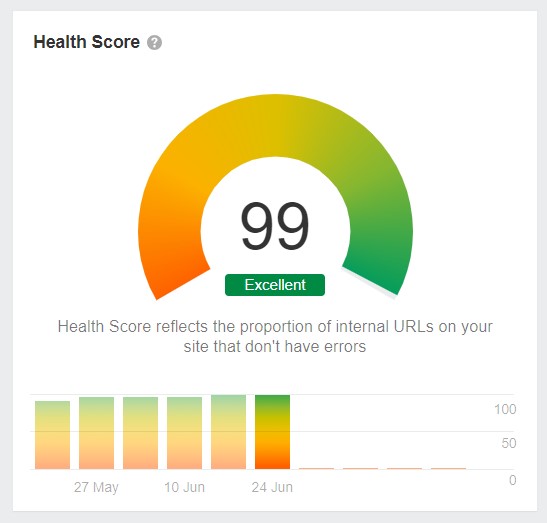
Make sure your WordPress site works well in search engines and is easy for people to use by addressing these important fixes.
Site Speed and Performance Optimization
Issue: Slow website due to large images, messy code, or bad hosting.
Solution: Make images smaller, use plugins to speed up your site, and pick a good host.
Duplicate Content and Canonicalization
Issue: Same or very similar content on different pages confuses search engines.
Solution: Use tags to tell search engines which page is the main one.
Broken Links and Redirects
Issue: Links on your site that don’t work anymore.
Solution: Regularly check for broken links and use tools to guide users to active pages.
Mobile-Friendly Design & Performance
Issue: Site isn’t easy to use on phones and tablets.
Solution: Make your site work well on all devices or use a separate mobile version.
XML Sitemap & Robots.txt
Issue: Search engines need a map to find all your pages.
Solution: Use tools to create a robots.txt and sitemap, and tell search engines what to look at.
Structured Data
Issue: Search engines have trouble understanding what your content is about.
Solution: Use special tags to help them understand better.
SSL (Secure Socket Layer)
Issue: People need to know their data is safe when using your site.
Solution: Get a special certificate to keep data safe and help your site rank better.
URL Structure & Permalink Optimization
Issue: Website addresses that aren’t clear or don’t use keywords.
Solution: Make web addresses short and easy to understand, and use keywords to help search engines.
For non technical tips: 5 Non Technical SEO Basics You Need to Master
8 Steps to Fix Technical SEO for WordPress
Below are the eight SEO tips for WordPress. Remember to focus on ensuring your WordPress site is set up correctly, has good content, functions well, and is free of errors. Pay attention to the site setup, the content, site functionality, and identifying any mistakes.
Step 1: Make your Website Search Engine Detectable
First things first, you gotta check if search engines can actually find your WordPress site. Just type in site:example.com in the search engine and see if your website shows up in the results. Replace ‘example.com’ with your own domain. If your site doesn’t show up, you should check the visibility settings in WordPress. Go to Settings » Reading from your WordPress admin panel. Go to the Search engine visibility setting and disable the ‘Don’t allow search engines to index this site’. This option is typically enabled if your website is under construction or in maintenance mode. It’s important to create an XML sitemap to help search engines to find and index your content. Tools like AIOSEO can help you generate and customize various types of sitemaps to improve the crawling process.
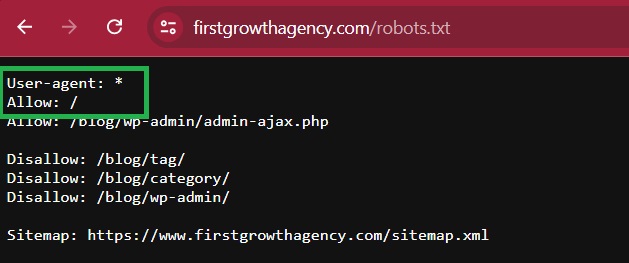
The robots.txt file indicates search engine bots which pages to check or skip on your website. This helps improve how efficiently pages are indexed. For instance, a WordPress robots.txt file might permit crawling of /wp-content/uploads/ while blocking /wp-admin/ and other non-essential pages. This ensures that important pages get crawled and indexed promptly. Including sitemaps in the robots.txt file also helps search engines recognize and quickly index crucial content.
Step 2: Check Why your Pages are Not Indexing
Once your site is indexed, you want to make your content seen by people and included in search results. Crawling is when Google, Bing, and other search engines find and understand your website. Indexing is when they gather and store info about your website. Use webmaster tools like Google search console to check that. It lets you see how your site is doing in search results, find any issues, and submit your site to Google. If you haven’t used this tool before, check out our guide on how to add a WordPress site to Google Search Console. When you’re in Google Search Console, you can go to the ‘Pages’ report.
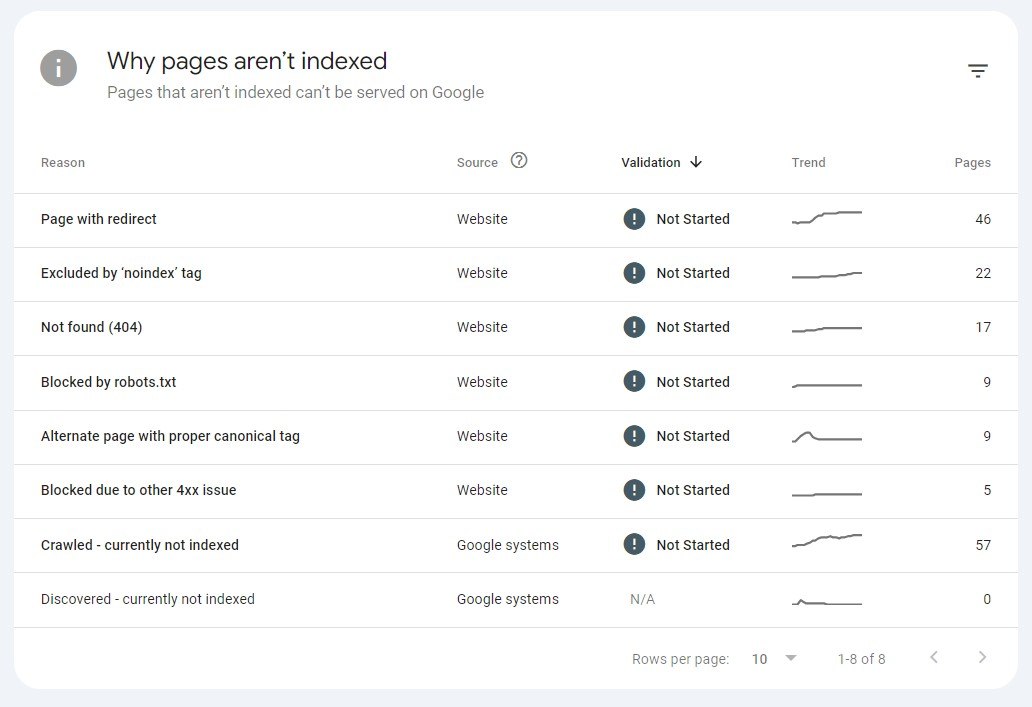
In Google Search Console, you can check which pages are indexed and which aren’t. If you scroll down, you’ll find the ‘Why pages aren’t indexed’ report, which shows crawling and indexing errors on your website and the affected pages. You can fix these issues to make sure your web pages show up in Google search results. Plus, you can also inspect individual URLs to see if they’re indexed on Google. Just enter the page link in the URL inspection tool at the top, and Google Search Console will let you know if the URL is indexed. If it’s not, you’ll get a ‘URL is not on Google’ message. Click the ‘Request Indexing’ so Google can crawl and index your page.
See: How to Increase Website Visibility on Google
Step 3: Make Your Website Highly Mobile Responsive
Ensure your WordPress site is mobile responsive as Google now prioritizes indexing your site’s mobile version over the desktop one. Check your site’s responsiveness by simply entering your URL and click the ‘Test URL’ to see if it is mobile-ready. If your site is not mobile-friendly, consider changing to a responsive WordPress theme. Responsive design is crucial for achieving high rankings on SERPs due to its impact on visibility, click-through rates, and search engine optimization (SEO).

Responsive design makes your website look good and functions well on all devices. More people use phones to use the internet. Responsive design means that a website doesn’t need different versions for different devices, which makes it easier for people to use and helps it show up in search engines. Search engines like websites that work well for users and are more likely to show them at the top of the search results. Responsive design also helps with a website’s internal linking, making sure that links work the same way no matter what device someone is using. This helps the website show up well in search results.
Step 4: Optimize Existing Content on your Website
Creating really awesome and relevant content is super important for both people and search engines. But it’s also crucial to make sure that your content is set up to be easily found and understood by search engines. Here are a few things to think about. Meta tags give info about your pages to search engines and users. It helps them both understand the content and context of your site. Make sure you have unique and descriptive meta titles and descriptions for each page, and try to include SEO kws. H1-H6 are used to structure your content and show the hierarchy of your headings and subheadings. Use heading tags the right way, with H1 as the main heading of your page, followed by H2, H3, and so on.
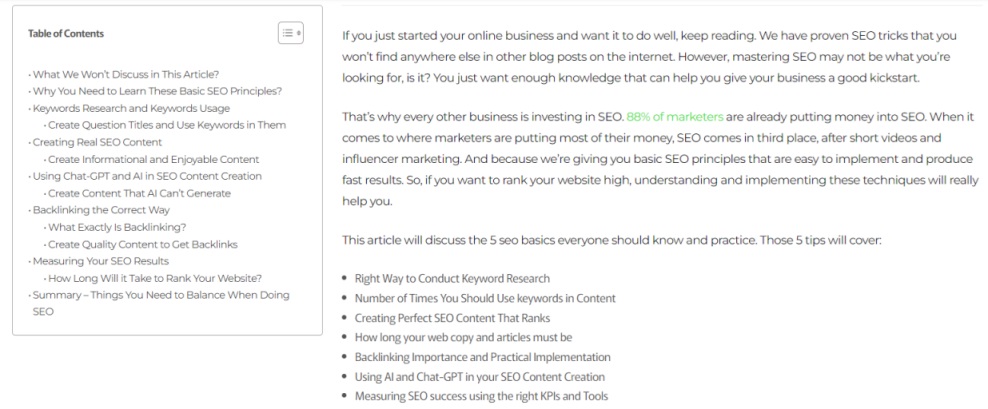
Making your content look better isn’t just about aesthetics – it also helps search engines understand what your site is about. One important thing to consider is how your images can reduce your site’s speed if they’re not optimized. To speed up your site, make sure to shrink your images, give them relevant file names and alt tags, and use the right format and size. You can use plugins like Image Optimization & Lazy Load or Smush to handle this for you. Structured data, also known as schema markup, is a standard way of informing search engines about your site’s content. By using structured data, search engines can easily understand your website, making it easier for more people to find you online.
Read: 6 Best Social Media Sites for SEO
Step 5: Make your Website Super Fast
Your website speed is a super important part of your WordPress SEO. Google looks at how fast your pages load and favors quick sites over slow ones in search rankings. You can check your website’s load time with a site speed test. One great tool for this is MonsterInsights, a top Google Analytics plugin that gives you a site speed report right in your WordPress dashboard. First, you need to install Google Analytics using MonsterInsights on your WordPress site. Then, go to the Insights and then Reports page from your WordPress admin panel. Click on the ‘Site Speed’ tab and it’ll show you an overall score for your website speed for both desktop and mobile, as well as other important speed metrics. Scroll down to get recommendations and goals for each metric you should aim for.
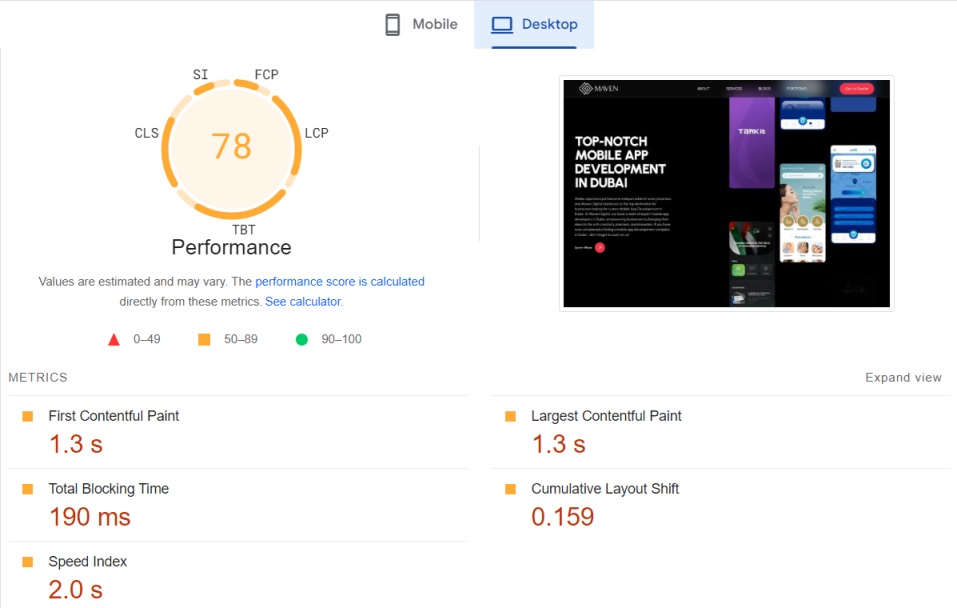
If you want to speed up your website, check out our awesome guide on how to make your WordPress site load faster. Also, minify your CSS and JavaScript files. When we say minify, we mean stripping out all the extra spaces, lines, and unnecessary stuff from the files. When users visit your website, they load CSS, HTML, and JavaScript through their browsers. By making these files smaller, you can seriously speed up your website. There are plenty of WordPress plugins and WordPress hosting services that can help you minify your CSS and JavaScript files, such as WP Rocket and SiteGround.
Step 6: Fix Internal Links and Orphaned Pages
Internal links are pretty crucial in your website’s technical SEO setup. Search engines like when websites have a good internal linking system with minimal orphaned pages. Some tools out there come with a cool SEO Link Assistant feature that helps you find link opportunities and can even automate the process for you.
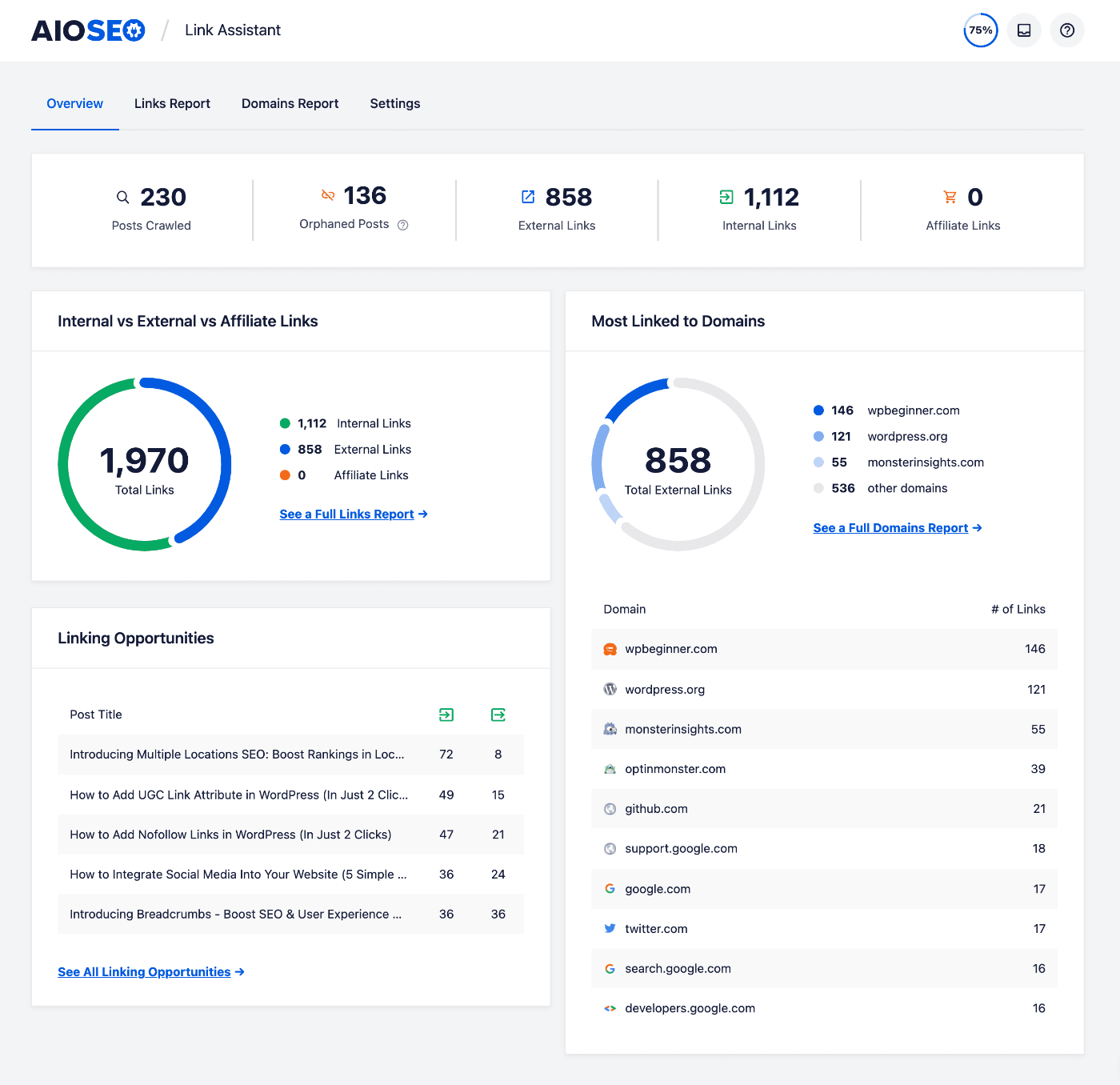
This plugin is good for WordPress internal linking. It looks through all the links on your website and gives you a super detailed report. Check how many internal links, outbound links, and affiliate links are there in each post and page. It even suggests all the links in one spot, and you can quickly add internal links to your older posts with just one click.
Step 7: Scan for Malicious Files on your Website
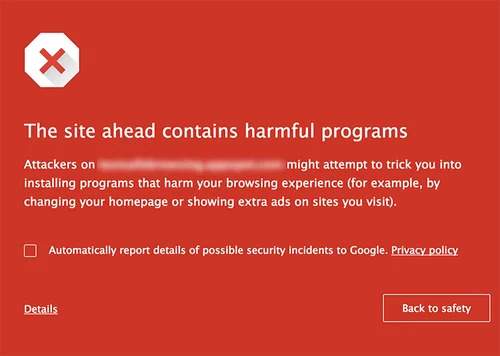
Remember to make sure Google doesn’t flag your site for malware. It’s essential for technical SEO to ensure that your site is not marked by Google for malware or unwanted software. If Google sees your website as a security risk for users, it will display a warning message like “Google safe browsing malware warning,” which can really hurt your WordPress SEO.
Just wanted to remind you about keeping your website safe. Malware websites scare off visitors and hurt your site’s traffic and rankings. One way to check for bad stuff on your site is by using a WordPress security scanner. We personally use Sucuri at WPBeginner because it’s an awesome WordPress firewall and security plugin. It looks for things like malware, spam injections, and bad code, and helps to clean up the website.
Check: Are Security Headers a Ranking Factor? Google Answers!
Step 8: Do server-side rendering for faster loads and improved SEO
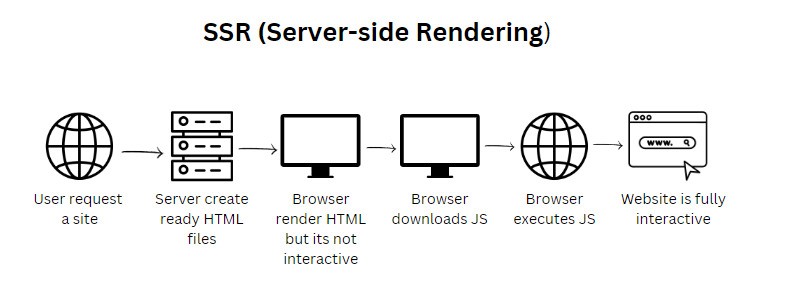
Another important thing for SEO is to make sure your site’s JavaScript renders on the server side, not the client side. Server-side rendering means the JavaScript files render on the website server, while client-side rendering means the JavaScript files render in the user’s browser. Client-side rendering is not good for your site’s user experience and SEO because it puts the burden of loading your site quickly on the visitor. Also, search engine bots use JavaScript resources for crawling and indexing your content, and client-side rendering could cause them to miss some of your JavaScript content. With server-side rendering, your website server takes care of ensuring that everything loads quickly.
Don’t stress about going through every single point in the technical SEO guide all at once. Take it step by step and you’ll get through the list. In order to ensure that JavaScript is rendering on your site’s server, try running a site speed test. If your website is slow, this could be the reason. You can also check crawled pages in Google Search Console to see if Google missed any content while crawling. If so, it might be due to JavaScript-related SEO issues. That’s all for now. Hopefully, this article helped you master a WordPress technical SEO framework.
Conclusion
Make sure your WordPress site is technically optimized so that you can rank your website high. By following the steps we described in this WordPress SEO guide, you’ll be ready to fix common technical SEO problems and put in place effective strategies to make sure search engines find and understand your site easily. Remember, a well-optimized site not only ranks higher but also makes it easy for visitors to use, helping to bring in more traffic and reach your online goals. If you keep up with regular maintenance and updates, you’ll definitely see the benefits of a strong technical SEO framework. Contact First Growth Agency, and we’ll help you with improving your website’s technical SEO.
FAQs
1. What is technical SEO for WordPress?
Technical SEO for WordPress is the process of improving the technical setup of a WordPress website so search engines can crawl, understand, index, and rank its pages more effectively. It includes improving site speed, mobile responsiveness, XML sitemaps, robots.txt, redirects, URL structure, structured data, security, and indexing issues.
2. Why is technical SEO important for WordPress websites?
Technical SEO is important for WordPress websites because even high-quality content may not rank well if search engines cannot access or understand it properly. A technically optimized WordPress site loads faster, works better on mobile devices, avoids crawl errors, improves user experience, and gives search engines clear signals about which pages should appear in search results.
3. How can I check if my WordPress website is indexed by Google?
You can check if your WordPress website is indexed by typing site:yourdomain.com into Google search. If your pages appear, Google has indexed them. You can also use Google Search Console to check indexed and non-indexed pages, inspect individual URLs, find crawl issues, and request indexing for important pages that are not yet showing in search results.
4. What are the most common technical SEO issues in WordPress?
Common technical SEO issues in WordPress include slow loading speed, broken links, duplicate content, poor mobile responsiveness, missing XML sitemaps, incorrect robots.txt settings, weak permalink structure, missing canonical tags, unoptimized images, security issues, and pages blocked from indexing. Fixing these problems helps improve visibility and user experience.
5. How does website speed affect WordPress SEO?
Website speed affects WordPress SEO because slow-loading pages create a poor user experience and can reduce engagement, conversions, and search performance. Search engines prefer websites that load quickly and work smoothly. WordPress site speed can be improved by compressing images, using caching plugins, reducing unnecessary code, choosing reliable hosting, and minifying CSS and JavaScript files.
6. Why is mobile responsiveness important for WordPress SEO?
Mobile responsiveness is important because many users browse websites from mobile devices, and Google primarily uses the mobile version of a website for indexing and ranking. A responsive WordPress website adjusts properly across phones, tablets, and desktops, making it easier for users to read content, click links, complete actions, and stay longer on the site.
7. How do XML sitemaps and robots.txt help WordPress SEO?
XML sitemaps help search engines discover important pages, posts, categories, and other content on a WordPress website. The robots.txt file tells search engine crawlers which parts of the website they can or cannot access. When both are set up correctly, they improve crawl efficiency and help search engines focus on the most important pages.
8. How often should technical SEO be checked on a WordPress website?
Technical SEO should be checked regularly because WordPress websites often change through new plugins, theme updates, content updates, redirects, and server changes. A basic technical SEO check should be done monthly, while a deeper audit should be completed after major website updates, redesigns, migrations, plugin changes, or sudden drops in rankings or traffic.