Different email service providers have different ways to get the emails flagged. So having familiarity with one system doesn’t guarantee you can do it on any other email service provider’s interface. So we will teach you in this blog how to flag emails, unflag them and how to manage a flagged email.
Flagging emails put a special mark on them for easy searching for later use. If you want to remember or read some email again in the future, you can flag it to find it easily. Now, let’s learn in detail what does flagging an email do. We’ll also talk about how to flag emails.
Read: What Is Email Marketing And How To Do It Right?
Flagged Email is Marked With a Fag or Star
This bookmark sort of thing helps you remember the emails you want to follow up on and track down in the future. Your recipients also reply to you quickly when you see your emails are flagged, as they give a symbol of time sensitivity and importance. So, ultimately, you save your time and effort. However, it doesn’t alert the recipient in any different way.
Flagged Email Have Different Meanings
Firstly, it indicates its importance or to remind the recipient to follow up on it. It indicates that the email requires action or follow-up such as replying to the sender, taking certain actions based on the email’s content, or simply marking it for future reference.
Difference Between Flagging and Starring
In email platforms, important emails are marked using flagging or starring.
Feature
|
Flagging
|
Starring
|
|
Platforms
|
Used in numerous email platforms
|
Commonly used in Gmail
|
|
Symbol
|
Usually a flag symbol
|
Typically, a star symbol |
| Filtering |
Allows inbox filtering of flagged emails
|
Allows inbox filtering of starred emails
|
Benefits of Flagging an Email
These are some benefits of flagging emails:
- Flagging emails can improve organization, increase productivity, and prioritize important tasks.
- Improved organization by marking important emails for easy retrieval.
- Increased productivity by ensuring important follow-up tasks aren’t missed.
- Better prioritization of emails, helping you focus on the most important ones first.
Check: Email Marketing Trends in 2026 to 2027
Different Types of Flagged Emails
Modern email clients offer different flagging options, such as setting reminders or categorizing emails. Let’s talk about them below.
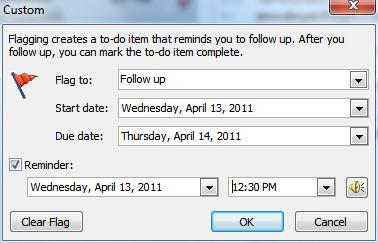
Follow-up Flags
These are used when you want to remind yourself to revisit an email later. It’s like setting a little alarm to check back on something after some time, so you don’t forget to respond or handle it.
Important Flags
These flags show that an email is more significant than others. Marking an email as important helps you quickly spot messages that need attention but may not need immediate action.
Urgent Flags
These are for emails that need to be addressed right away. An urgent flag signals that the message requires your immediate attention and cannot be delayed.
How to Flag an Email?
Flags in emails are like putting a special mark on important messages so that you notice them easily in your inbox. Different email services have their own way of doing this, but it’s usually pretty simple to do with just a few clicks.
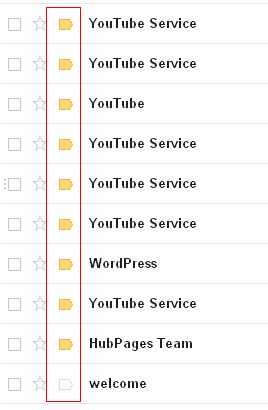
How to Flag an Email in Gmail?
To flag an email as important in Gmail:
- go to your inbox
- locate the message you want to flag
- Next to the star on the left side of the message row, click the arrow button.
This will mark the email as important, and you can easily find it later by using the “Important” filter on the left side of your inbox.
How to Flag an Email in Outlook?
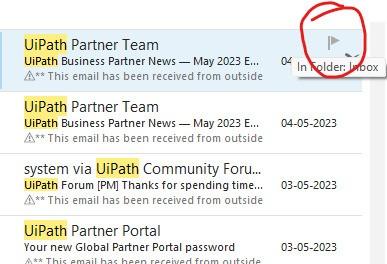
You can easily apply email flags in Outlook to remind yourself to follow up on important messages. To do this:
- Open Outlook.
- Select the message you want to flag,
- Click the flag button on the right side of the message list.
This way you can get flagged email outlook done.
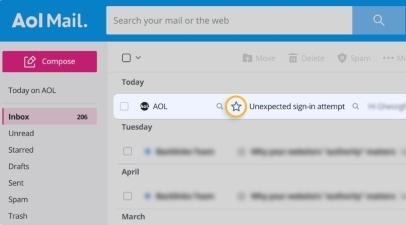
How to Flag an Email in AOL?
You can mark emails in AOL so you don’t forget to follow up or check for responses by a specific date. To do this:
- Open your AOL inbox.
- Find the email you want to mark.
- Hold your mouse over it.
- Click the little flag icon that shows up on the right side of the email’s subject line.
Read: Does Email Marketing Work? How to Do It Effectively?
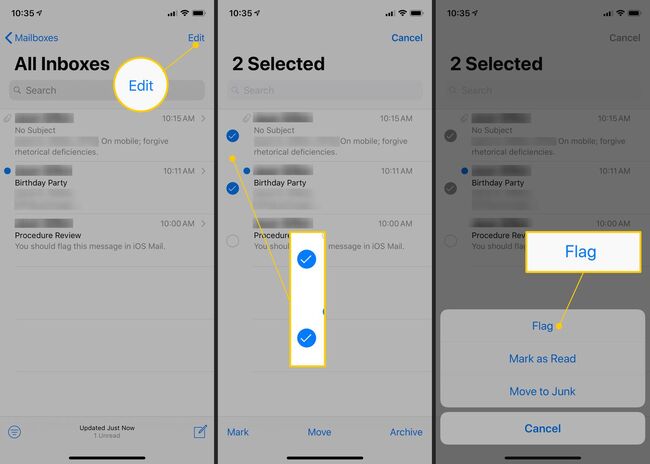
How to Flag an Email on an iPhone?
Finally, to flag an email on your iPhone:
- Open the message you want to flag.
- Tap the reply button, then select Flag.
- Choose a color for the flag by tapping the corresponding colored dot in the menu.
After marking the email, you can easily locate it later by creating a unique folder for each color of flag in your Mail app. This way you can turn a message into a flagged email on iPhone.
Conclusion
Now you know what does flagging an email do. Using flags or stars to mark important emails helps you stay organized and remember which messages are crucial. This makes it easier to find them later and ensure that you don’t overlook anything important. Different email services have their own methods for flagging emails, but the overall goal is to help you keep track of your most important emails. By following these tips, you can efficiently flag and manage your emails, making it easier to stay on top of your important messages.
FAQs
1. What does flagging an email do?
Flagging an email marks it as important or reminds you to follow up on it later. It helps you find the email quickly, organize your inbox, and keep track of messages that need attention. A flagged email usually appears with a flag, star, or similar symbol depending on the email platform.
2. Does flagging an email notify the recipient?
No, flagging an email does not notify the recipient. The flag is usually only visible to you inside your own email inbox or sent folder. It is mainly used for personal organization, reminders, follow-ups, and prioritizing important emails.
3. What is the difference between flagging and starring an email?
Flagging and starring both help mark important emails, but the symbol and platform may be different. Outlook commonly uses flags for follow-ups, while Gmail often uses stars and importance markers. Both features help users filter, find, and manage important messages more easily.
4. Why should you flag an email?
You should flag an email when it needs a reply, follow-up, review, or future action. Flagging helps improve organization, prevents important tasks from being missed, and makes it easier to focus on priority messages instead of searching through a crowded inbox.
5. What are the different types of flagged emails?
Different email platforms may offer follow-up flags, important flags, urgent flags, colored flags, or reminder-based flags. Follow-up flags remind you to take action later, important flags highlight priority messages, and urgent flags indicate emails that need immediate attention.
6. How do you flag an email in Gmail?
In Gmail, you can mark an email as important or star it for easy access later. Open your inbox, find the email, and click the star or importance marker next to the message. You can then find it later by checking the Starred or Important section in Gmail.
7. How do you flag an email in Outlook?
In Outlook, you can flag an email by selecting the message and clicking the flag icon next to it. You can also set a follow-up reminder for a specific date or time. This helps you remember which emails need a response, review, or action.
8. How can you manage flagged emails effectively?
You can manage flagged emails effectively by reviewing them daily, removing flags from completed tasks, using reminder dates, organizing emails into folders, and filtering your inbox by flagged messages. This keeps your inbox clean and helps you stay on top of important communication.