Instagram, owned by Meta, is a powerful marketing tool in the current digital landscape. If you integrate a strategic and data-driven approach to its marketing, you can drive top-of-the-line audience engagement that ultimately benefits your business or brand. This feature was introduced a while ago, in 2021. Initially Instagram allowed collaborating with up to two brands or influencers. Now, as of 2026, you can collaborate with up to 20 accounts.
This blog will particularly talk about driving such engagement through Instagram collaboration. So get ready to learn some game-changing tips on how to collab post on Instagram.
Read: How To Add Your Business Location On Instagram?
Define Collaborate on Instagram
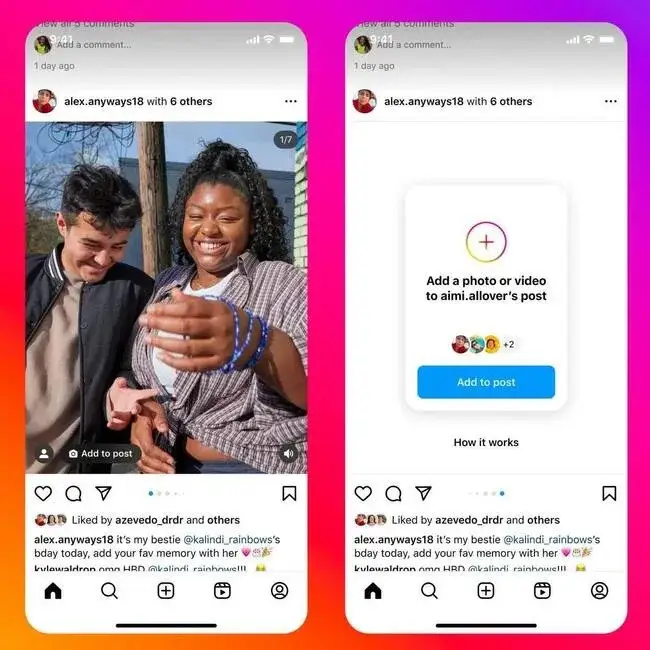
The basic purpose of this feature is to allow you to collaborate with other influencers or brands on your posts, reels, videos or carousels. It defines how to post on Instagram with someone. But it’s different from the tag option. Think of it like a post that has been created by multiple people. Instagram allows each profile to showcase that post on their profiles. You don’t have to click on the tagged tab on your or other collab members profile to see that very post. This differs it from the tagging option.
Instagram lets you collaborate on posts and ideas to boost reach and engagement. Here you collaborate with big and relevant brands and influencers to grow on Instagram. It might sound bad but to get you through its meaning, it’s like using someone else’s account as a clout to level-up yours.
How Collaborate Works on Instagram?
The person who posts the reel, video, photo or carousel (except story) invites other members to be a part of it. They can invite up to five people. Each of them would get a request that if they accepted would enable them to show that post on their profiles. The post will appear on everyone’s profile without any difference in its presentation, regardless of who posted it first. Each profile’s name would appear on the header of the reel, video, carousel or post in the grid tab. Each of the accounts will receive a notification whenever someone likes or comments on the collabo post.
Put simply, the post appears the same everywhere no matter who owns it. Instagram collaboration option allows the stats merging which enables everyone to share likes, views and engagement every post gets without the need to post it individually and tagging afterwards. However, it still doesn’t replace the branded content tag option because that’s a different thing. You need to become eligible to use it for paid partnership programs.
Who Owns the Collaborate Post on Instagram?
Although everyone who appears on the header of the post owns the post, the person who uploaded it has the upper hand. It means he can delete the post from Instagram or edit it. The rest can also delete it but only from their own profiles. They can choose to not collaborate or remove it from their profile after they’ve accepted the Instagram collaboration request. If someone makes their account private, only their friends can see what they posted. They can ask private accounts to work together, but those accounts still have to let new friends follow them.
We’ve introduced the concept of collaborating on Instagram and how it looks. Now before we go on explaining how to collaborate, and when to do it for maximum results, let’s first talk about its overall benefits.
Read: Top Instagram Influencers Non Celebrity
5 Perks of Instagram Collab Posts
Instagram collaboration shares audiences, likes, views, comments and helps the smaller account get the reach and engagement they need to grow on the platform. Think of a big influencer or brand who’s collaborated with you in one of their posts. It’ll give you tenfolds of engagement you already get. With that said, let’s explore x advantages of collaborating on Instagram.
1) Social Proof
The combined force of you, creator and a brand brings in more than a single handed effort. This subconsciously impacts people and they perceive your post as a social proof for the creator’s or brand’s credibility. Collab posts on Instagram acts like a testimonial, driving people to hand over their hard money for your products or services.
2) Increased Followers
If you’re a post collaborator with some big brand or influencer, people are most likely to drop by a follow on your profile. The collab option acts like an indirect endorsement you receive from another party, making people perceive you as some big shot as you become the co-author of the content.
3) Less Duplication
Instagram prefers that users do not share the same posts as others. When creators post the same pictures or videos, they are competing for attention. By working together using the collab feature, both creators can help each other and make Instagram’s algorithm happy and support them in return.
4) More Engagement
Collaborating on Insta happens when you share a similar audience with a brand or creator. It helps create a friendly community. People feel connected and are more likely to like, comment, and share the post. Each author shares their own ideas, which can lead to interesting talks among their followers. As a result, Insta shows the content to even more people.
5) Enhanced Exposure
Collaborating on Instagram showers exposure on everyone’s profile involved. The best is you don’t have to worry about putting one man army work behind that post. You use a brand or influencer as a clout to attract eye balls to your profile.
Read: What is The Largest Social Media Platform for Professionals?
Difference Between Tagging and Collaborating on Instagram
While we’ve cleared the differences between both in the above section, here’s a more detailed version of the difference between tagging and collaborating on Instagram:
Aspect
|
Tagging
|
Collaborating
|
| Visibility |
Visible only to your followers. |
Visible to both your followers and your collaborator’s followers. |
| Post Appearance |
Appears on your profile and in the tagged section of the collaborator’s profile. |
Appears on both collaborator’s profile grids and feeds. |
| Acceptance Requirement |
No need for acceptance by the tagged user. |
Collaborators must accept the collaboration before it appears on their feed. |
| Sharing Beyond Feed |
Does not appear on the main profile grid but only in the tagged tab. |
Automatically shared on both collaborators’ feeds. |
| Stories |
Mentions can be added to Stories. |
Collaborations are not available for Stories but only for posts. |
| Engagement Impact |
Engagement is limited to your audience. |
Likes, comments, and views are shared, benefiting both parties. |
| Mutual Benefit |
Your followers are directed to the tagged account. |
Both collaborators share the same post and audience engagement. |
| Example Scenario |
Sarah tags Sip & Swirl Café, but her followers need to tap the tag to reach Sip & Swirl’s account. |
Sarah and Sip & Swirl Café both share the post, making it accessible to both audiences for mutual growth. |
How to Collab Post on Instagram?
Collaborating is the same as making a regular post or video. The only difference is that before you share it, you invite a collaborator. It’s a new way to work together online, helping brands, creators, and others connect and share in fun ways. Whether you want to collaborate on a reel, image, video, or carousel, you need to go through these simple steps:
Click the + Sign
Choose to upload a video, image, reel or anything to collaborate. Add caption, hashtags, or location if you want.
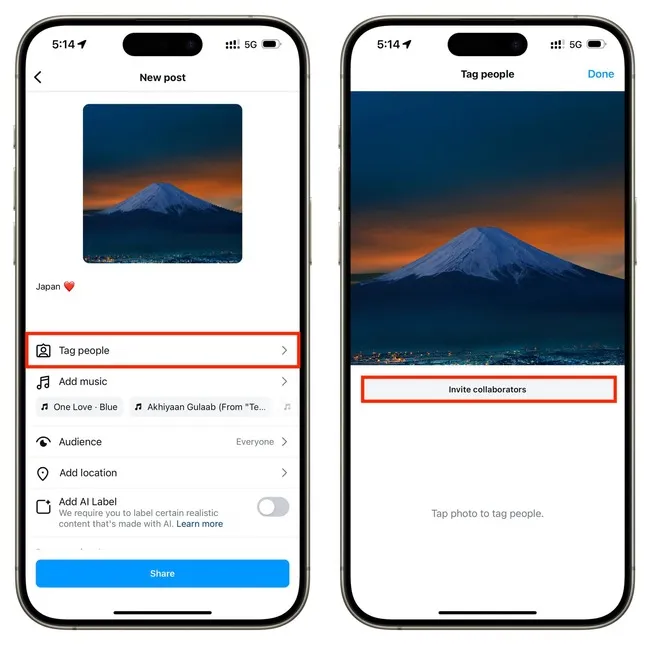
Click Tag People
Before publishing, click the invite Tag People button. But don’t tag. It will show you two options. Pick Invite Collaborator.
Choose Collaborators
Search and select the people or accounts you want to collaborate with. Finish the process by publishing the post.
Wait Until They Accept Your Invitation
Those accounts you’ve collaborated with will get a notification in their DM section or notification tab. Once they accept your invitation, they will become a collaborator. The post will appear in their profile’s grid section.
Read: What is A Social Media Audit? How To Do A Quick Social Media Audit?
5 Times You Should Use the Instagram Collaborate Option
Below we briefly talk about a few instances where using the Instagram collab options serves the best.
1) Introducing Something Exciting
Introduce new products, services or anything exciting with collab posts to get more people excited and sell more. When you launch a new product with another brand, use an Instagram Collab post as it maximizes your reach.
2) Partnering With a Brand/Creator
Instagram Collab posts are a fun way for two brands to work together. It’s also a stronger way to show support than just tagging someone. They allow both to share the same post and show that they are teaming up. This way, everyone benefits.
3) Attending an Event
Conferences, exhibitions, or concerts are posted on Instagram. They can collaborate with their important guests’ profiles as it can demonstrate their impact while benefiting the attendees or speakers. Similarly, it can be done at pre-events to increase awareness and involvement, especially when supporting a cause.
4) Giveaways
If you’re posting a giveaway alongside another brand or content creator, the Collab post is a good option to share the giveaway news. Organize a giveaway or contest with another account. Both partners can share the same post, boosting entries and engagement.
5) Tutorials
If you’re a brand you can accept an invitation of collaboration from the people who post content about your product or service. It benefits both groups. This can help brands, creators, or influencers reach new people and provide good information.
Elements of a Successful Instagram Collab Post
Want to use the collab option for the cool posts on Instagram? Here are some simple tips to help you get started.
Impact Research: Only collaborate when you’re certain about the positive impact. You can hire experts like First Growth Agency to assist you with collaborating with top-notch profiles for maximum impact.
Resonating Content: Make sure the Instagram collaboration post reflects your brand’s or creators’ values and style. Being consistent helps you connect with both audiences and improves engagement on social media.
Precise Targeting: Use analytics and social media management tools to learn about your audience’s demographics and preferences. First Growth Agency can help you choose the right collaborators and create content that resonates with your audience.
Strategic Timing: Use a social media content calendar to plan and schedule your Instagram collaboration posts at the best times. If you want to publish a music video in collaboration with someone with a big profile, post your collab during the hot time. First Growth Agency can help you determine the perfect timing for your collabo posts.
Read: Leading Social Media Audit Tools
Conclusion
Now you know how to collab post on Instagram. Instagram collab will help you when your profile looks good and has a clear bio with nice photos. Collab posts can drive you more visibility, shares, likes, comments, and overall engagement. Whether you want to launch a product or service or partner with some big-shot profile on any topic, this feature offers a golden opportunity to elevate your Instagram presence. And that’s how to collaborate on Instagram.
All you need is the right strategy to carry out this. If you haven’t planned a collab yet, now is a good time to do it by contacting First Growth Agency for professional assistance.
FAQs
1. What is an Instagram Collab post?
An Instagram Collab post is a post, Reel, or carousel that is shared by more than one account. When the invited collaborator accepts the request, the same content appears on both profiles and both account names are shown on the post. Likes, comments, views, and engagement are shared on the same post.
2. How do you collaborate on Instagram?
To collaborate on Instagram, create a post, Reel, or carousel as usual, tap Tag People before publishing, choose Invite Collaborator, search for the account you want to collaborate with, and publish the post. The invited account will receive a request and the post will appear on their profile once they accept it.
3. What is the difference between tagging and collaborating on Instagram?
Tagging only mentions another account in your post and usually appears in their tagged section. Collaborating makes the other account a co-author of the post. A Collab post appears on both profiles, shares engagement, and reaches both audiences, while a tagged post mainly stays on the original poster’s profile.
4. Why should brands use Instagram Collab posts?
Brands should use Instagram Collab posts because they can increase reach, engagement, followers, trust, and visibility. When two accounts share one post, both audiences can see and interact with it. This makes Collab posts useful for influencer campaigns, brand partnerships, product launches, events, tutorials, and giveaways.
5. Who owns an Instagram Collab post?
The account that originally uploads the Collab post has the main control over it. That account can edit or delete the post. Collaborators can remove the post from their own profile, but they do not have the same level of control as the original creator. This is why brands should plan content details before publishing.
6. Can you add a collaborator on Instagram after posting?
In some cases, Instagram allows users to add a collaborator after publishing by editing the post, tapping Tag People, and choosing Invite Collaborator. However, this feature may not be available for every account, post type, or app version. If the option does not appear, the post may need to be recreated with the collaborator added before publishing.
7. When should you use Instagram Collab posts?
Instagram Collab posts are useful when launching a product, announcing a partnership, promoting an event, running a giveaway, sharing a tutorial, or working with an influencer. They are best used when both accounts have aligned audiences and both benefit from sharing the same post.
8. Why is the Instagram Collab option not showing?
The Instagram Collab option may not show if the app is outdated, the account is private, the collaborator’s account has restrictions, the feature is not available in your region, or the selected content type does not support collaboration. Updating the app, switching to a public professional account, and checking account settings can help fix the issue.