TikTok Ads Manager: Setup, Benefits, Types, And Mistakes
Just like Facebook and Instagram, you can run ads on TikTok. For that, you need a TikTok Ads Manager. It allows you to create and manage ads on TikTok. You can create new ads and even groups of ads here. TikTok has a broad audience of 2.05 billion users. This means that you can reach the exact people who want to buy from you. Before we move on and start talking about how to set up TikTok Ads Manager to reach your audience, note that TikTok ads are short and interesting video ads. It’s not for infographic ads. So with that in mind, let’s talk about the process to set up TikTok Ads Manager.
Step-by-Step Process to Setting Up TikTok Ads Manager
Before you start, you will need to have a TikTok Business Center account and all the necessary documents to prove that you have a legitimate business. We will guide you through the process.
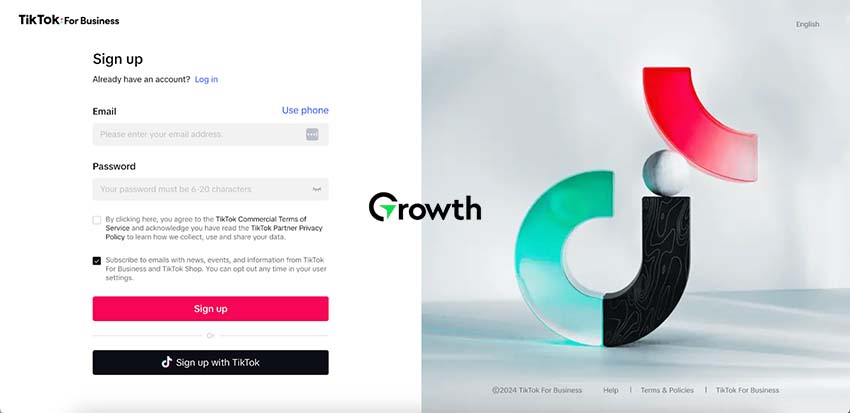
1) Sign Up by Utilizing your Email Address or Phone Number
After that, you just need to enter the verification code to finish signing up. You have two choices: you can either create TikTok Ads Manager account using your email or your phone number. You will need to confirm the code that you receive on your phone or in your email. At the end, you will need to say “yes” to the rules. Tap the small square, then tap Sign-up. That will finish the first part of TikTok ads manager login.
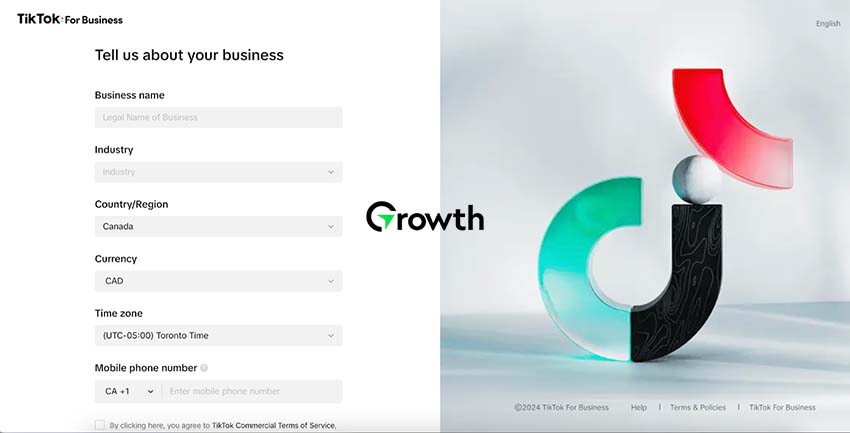
2) Provide Details About Business, Country, Region and Time Zone
You can’t change these details later so be careful. Choose your preferred currency for billing. Your business name must be the same or closely related to your legal name, otherwise your TikTok ad account evaluation will fail. To use the features like the TikTok Creator Marketplace or ad credit programs, your Business Name needs to be the same as the one on your license or the IRS SS-4 EIN Assignment Letter. Click Register to create TikTok Ads Manager account.
3) Enter the Website Address Using URL Format
Websites that don’t follow TikTok format will not be accepted during the TikTok ad account review. Choose the industry in which your product or service will be promoted such as tech or fashion, to help with targeting ads. Provide your business’s registered street address, state/province, and postal code. There’s also an optional business verification where you can provide your full business address to access extra features like the TikTok Creator Marketplace and ad credit programs. This will help you launch successful ad campaigns on TikTok.
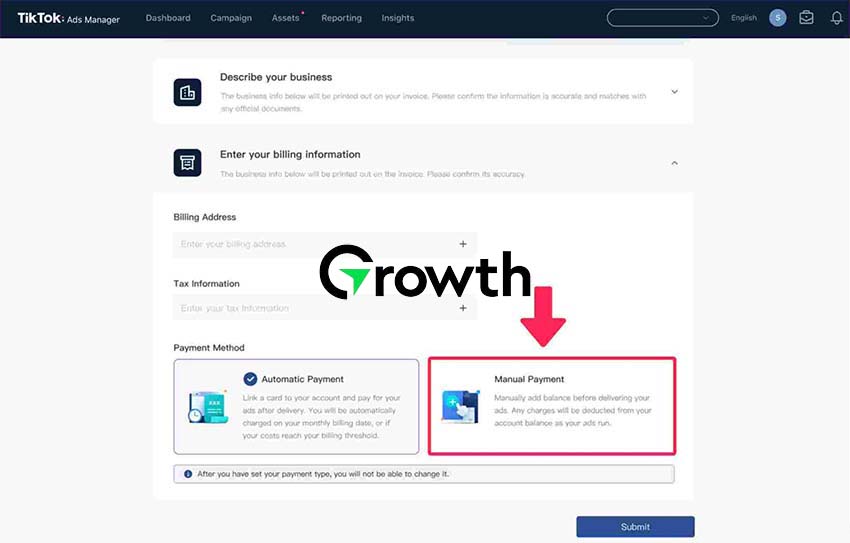
4) Go for Manual Payment Option
We’ll only talk about the manual payment method because not everyone can use the automatic one at first. Go to the Billing or Payment section in your Dashboard. Click Add Payment Method and then tap either credit/debit card or PayPal. Make sure to set it as the primary method because you can add multiple payment methods. Enter your card number, expiration date, CVV, and billing address. Finally, save and confirm your details.
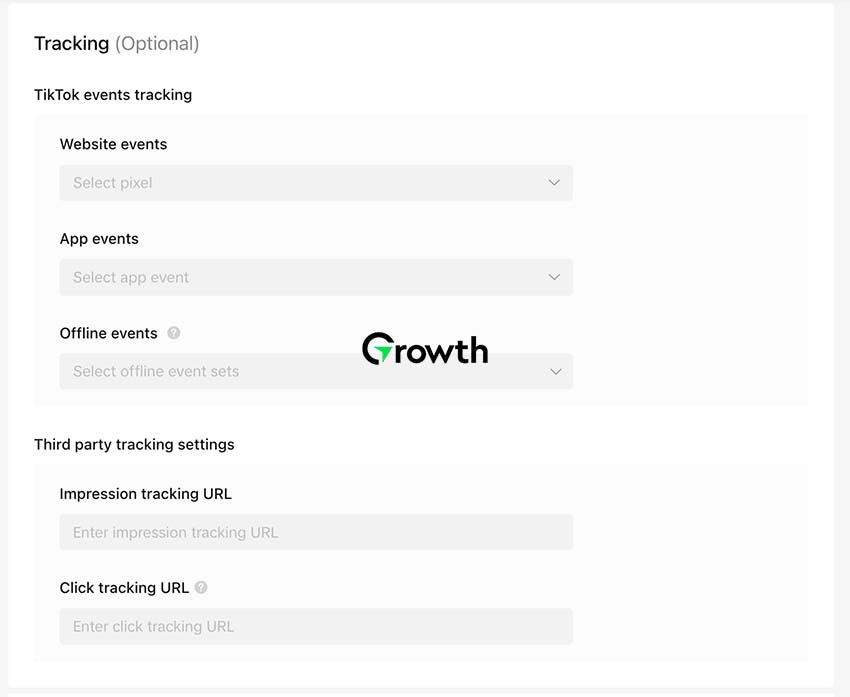
5) Set Up Tracking and Analytics in your TikTok Ads Manager
This lets you measure how well your campaign is doing and improve it later. Add TikTok Pixel to your website. It’s a small piece of code to keep track of actions that people take on your website after clicking on your TikTok ads, like visiting the site, making purchases, or signing up. Visit the Assets section in your TikTok Ads Manager dashboard, select Pixel, and then choose either the Standard (easy) or Developer (advanced) way to create and add the Pixel. Click on Set up Pixel and follow the guide to copy paste the code in the header.
6) Decide What Actions you Want People to Take on Your Ad
You can set up these actions in the Events section of the Pixel settings. This helps you keep track of these actions in your TikTok Ads Manager. Make sure your Pixel is installed correctly. TikTok has a tool to test if the Pixel is installed properly. Check and test your Pixel to make sure it is tracking actions accurately. Once your ads are running, regularly check and improve your ad campaigns in the Analytics section of TikTok Ads Manager. Now you’re ready to create your TikTok ads.
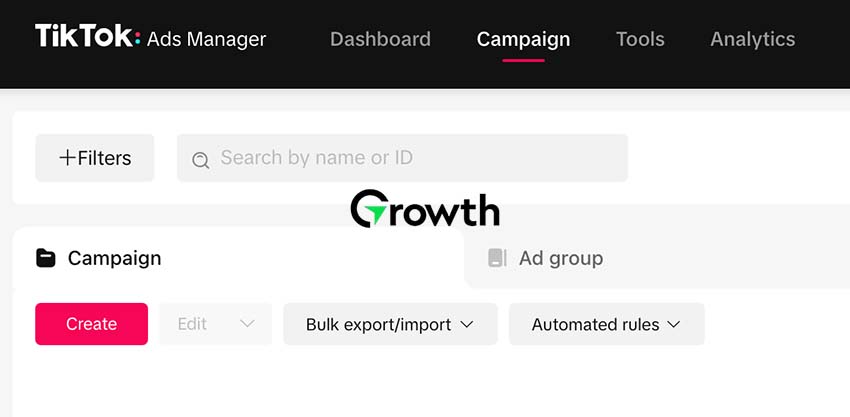
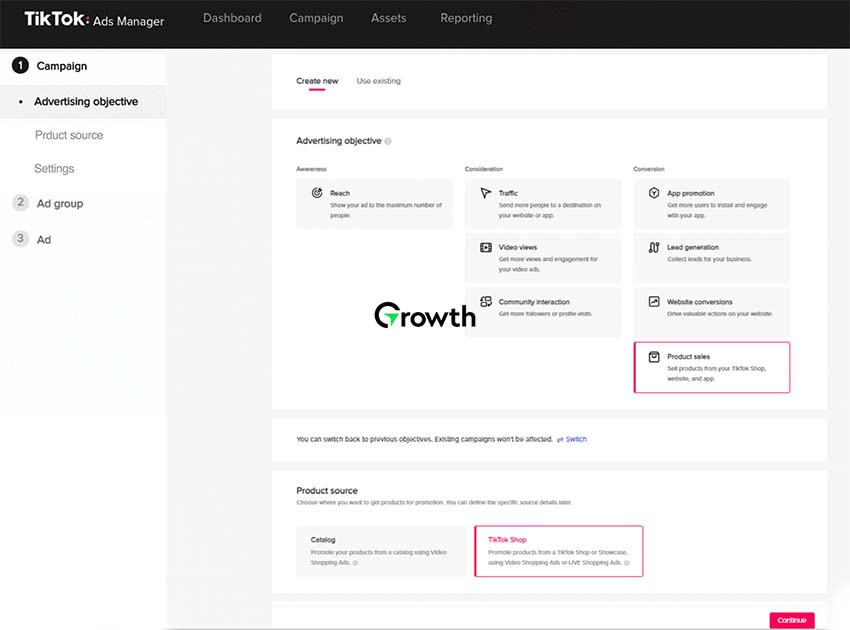
Now that you have set everything up, create your ad campaign in the Campaign section. You need to first decide what you want your campaign to achieve. Do you want to get more people to visit your website, install your app, or take particular steps like signing up or completing a purchase on your website? After you decide on this, choose from two options: Lifetime and Daily budgets. If you want to focus on creating brand awareness and spend a specific total amount, go for the Lifetime budget. If you want to slowly get the results you want, then using a daily budget is the best choice.
8) Decide Your Goals and How Much Money You Can Spend
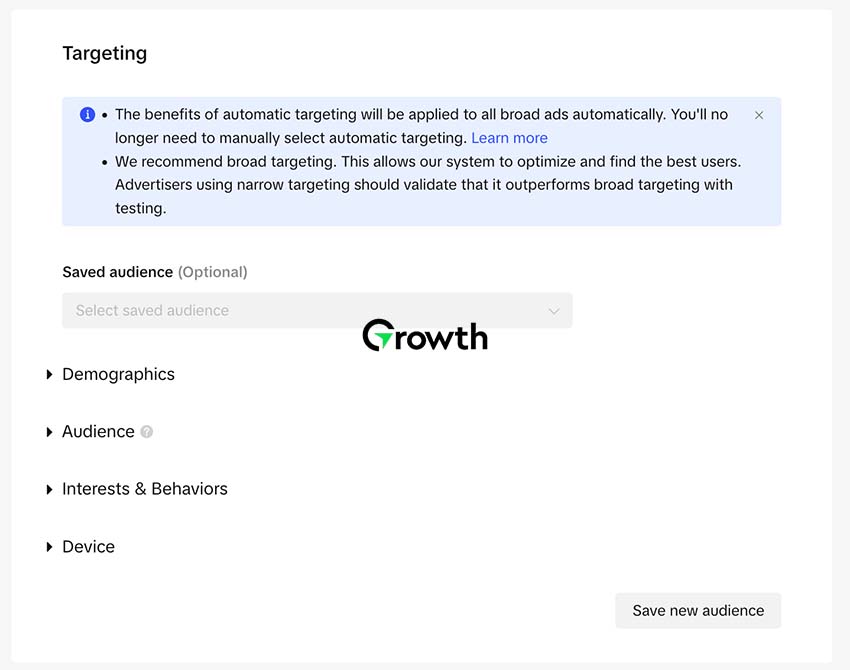
You will need to choose where and how you want your ads to appear, and most importantly, who you want to see them. This is what you are doing now: you need to select your main goal for the ad and the type of ad you want. Your goal should be based on what you want to achieve, like getting more people to download your app or visit your website. To decide who will see your ads, you should consider things like where people live, how old they are, what language they speak, and what they are interested in. You can also choose to show your ads to people who have interacted with your business before.
9) Decide Where to Put Your Ads
TikTok can show your ads on TikTok itself or on its partner news feed platforms. If you’re not sure, it’s best to choose Automatic placement and let TikTok decide. Otherwise, you can select Manual placement to control where your ads appear. Let TikTok try out different versions of your ads to get the best results. You can turn this feature on or off whenever you want. Choose how you want your ads to be delivered. You can pick standard delivery, which spreads your budget evenly over time, or accelerated delivery, which focuses on getting your ad seen quickly but uses up your budget faster.
10) Launch a New Ad and Submit your Approval
Choose a really interesting video or picture to use for your ad. Shorter videos work better. Follow TikTok’s recommendations for the best display on different devices. Upload your ad and use TikTok’s Preview option to make sure it looks just right before you launch it. Name your advertisement in a way that makes it different from other ads in the group. This will make it easier to manage your advertising campaign. Write an attractive advertisement that is short and clear. Use CTAs like Sign Up, Download Now, or Submit to start running your ad. After providing your account details, you will have your TikTok ads account in review, which may take up to 24 hours.
11) Monitor the Performance of Your Campaign
Your ad campaign is now running, but the key to its success is keeping an eye on how well it’s doing and being ready to make changes. Make use of TikTok’s strong Analytics tool. This tells you how well your ad is doing, how many times it’s been seen, clicked on, and led to sales. Compare different ad versions using A/B testing. Look at how people interact with the ads to choose the best one. Keep learning and staying updated about TikTok advertising because things change. What works today might not work tomorrow, so keep an eye on everything to make your ads better.
12) Perform Best Practices to Unlock Potential of TikTok
To make your TikTok ads better, be real and keep it short. TikTok likes real and short videos that are not too long, for instance, 21-34 seconds. Use the tall and narrow format for your videos. Most people watch TikTok on their phones, so it’s best to use the 9:16 dimensions for your videos. Use hashtags that are related to your brand and are popular. This will help the right people find your videos. You can also work with popular TikTok creators to promote your brand if they represent your brand’s values or are liked by the people you want to reach.
Now you know that TikTok Ads Manager is for personal accounts, while TikTok Business Center, available for business accounts, offers more features. Newbies can also get started in just a couple of minutes without needing any expert knowledge. Below are some benefits of TikTok Ads Manager.
Next-level Account Dashboard
There is a single and complete dashboard provided by TikTok Ads Manager. It provides access to in-depth insights of all your advertising campaigns, metrics, and budgeting tools on TikTok
Different Ad formats
There are different types of TikTok ad formats provided by this Ads manager that suit a variety of businesses.
Creative Video Advertisements Tools
There are different types of video templates that you can use. Easily create videos using your current photographs without having to be a professional editor.
Automated Ad Optimization
This feature allows you to automate your ads developing, distributing, and optimizing processes to make the campaign management more easy and efficient.
Detailed Targeting Options
This feature helps you focus on specific groups of people by using detailed information such as gender, where they live, how old they are, what they like, and other factors.
Creating Ideal Customers
This feature is called TikTok Custom Audiences and TikTok Lookalike Audiences. It helps you target more people who are similar to your existing consumers.
Easy Data Analysis
TikTok Ads Manager allows its users to easily track the performance of their. Using TikTok Pixel they can examine detailed data of their ads and also create reports using it.
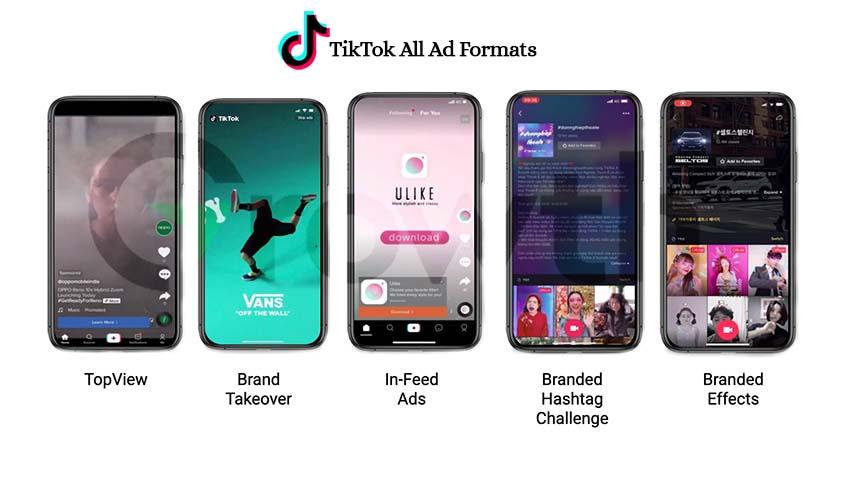
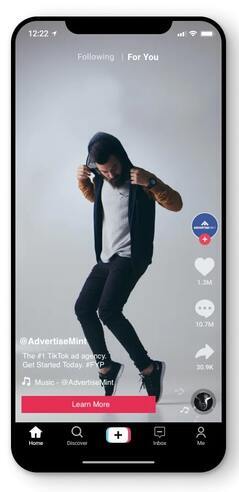
In-Feed Video Ads are TikTok’s standard ad format that plays automatically within users’ For You feed. Up to 60 seconds long, but ideally 15 seconds, these ads mimic the look and feel of native content, making them less intrusive. They feature a clickable CTA button that can drive traffic to external links, app downloads, or your TikTok Business Account. Design your videos vertically, keeping key visuals within safe zones to avoid being blocked by the interface.
2) TopView
TopView ads appear at the top of the For You feed when users first open TikTok, ensuring maximum visibility. These immersive ads can be up to 60 seconds long and are ideal for brand awareness campaigns due to their guaranteed wide reach and high impressions. To make an impact, brands should use engaging and memorable video content that captures viewers’ attention immediately.
3) Brand Takeover
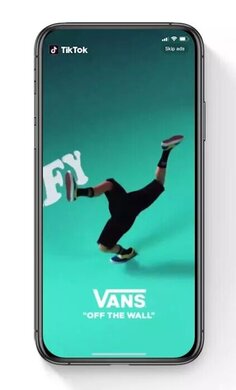
Brand Takeover ads are full-screen, high-impact ads that are the first thing users see upon opening TikTok. Designed for mass awareness, these ads can be either 3 seconds of an image or a short 3-5 second video, driving traffic to both internal and external landing pages. With 100% Share of Voice for the day, these ads provide exclusive visibility but come at a premium price, making them suitable for larger brands aiming for maximum exposure.
4) Branded Hashtag Challenge
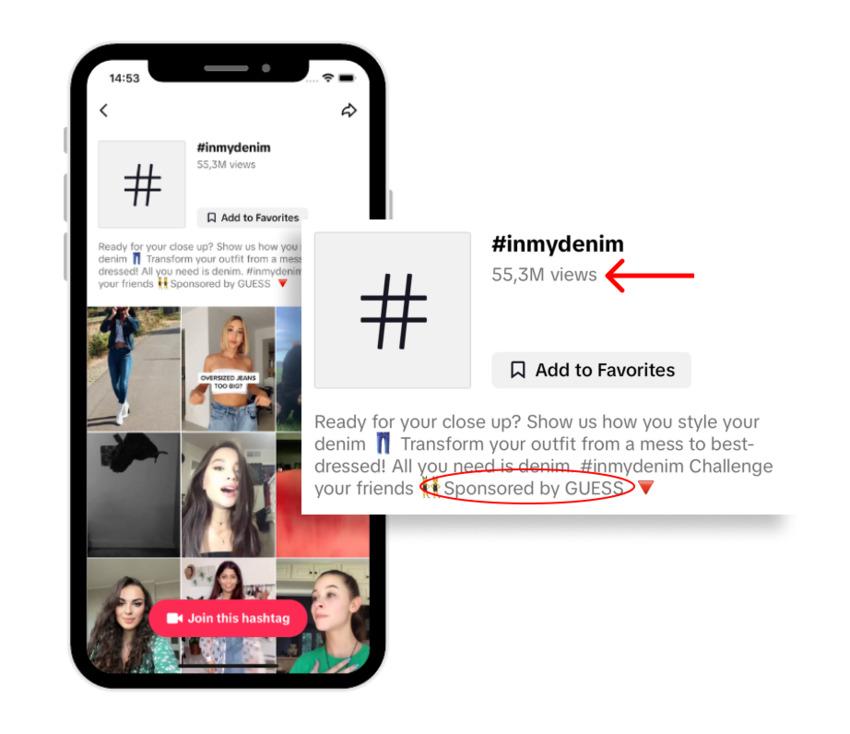
Branded Hashtag Challenges encourage user-generated content by inviting audiences to participate in a themed challenge. This format includes In-Feed video ads to promote the challenge, a featured banner on the Discover page, and a dedicated Hashtag Challenge page where all user submissions are aggregated. It fosters community engagement and allows brands to connect creatively with users.
5) Branded Effects
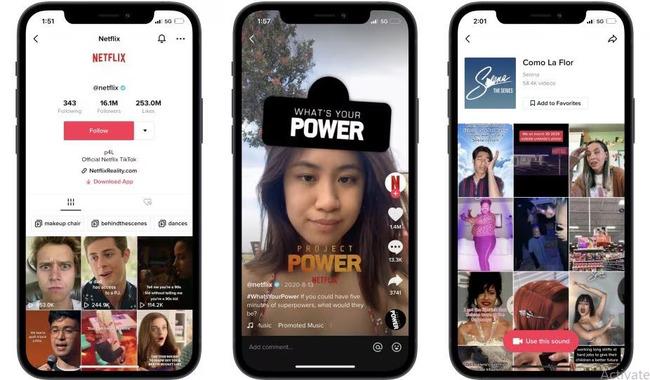
Branded Effects allow brands to create fun, shareable stickers, filters, and effects that users can incorporate into their own videos. This format can enhance standalone campaigns or complement a Branded Hashtag Challenge. By involving the audience in the creative process, Branded Effects lead to higher engagement levels and create a more interactive advertising experience.
Where Is TikTok Ads Manager?
Visit Advertising on TikTok signup page and login with your email address or phone number and set a password. There you will see the dashboard of TikTok Ads manager. Save your login credentials to access your TikTok Ads Manager account.
Sign in to your TikTok account or create a new one.
Click Authorize.
Create a TikTok Ads Manager account.
Click Register.
Finish creating your ad account from the Welcome to TikTok Ads Manager page.
How To Create TikTok Ads?
Log into your TikTok Ads Manager and navigate to an existing campaign or ad group.
Click Create to start the ad creation process.
Enter an ad name for your reference, then choose your ad format.
Use media templates or upload your own files.
Select a thumbnail and fill in the display name, promotional text, and a call-to-action from dynamic or standard options.
Add your brand’s profile image and the URL you want to promote, along with any relevant tracking URLs.
Preview your ad to see how it will look in different placements, then click Submit to send it for review.
Check the Ad status in your Ads Manager account.
Do You Need A TikTok Account To Run Ads?
TikTok Ads can be run without a personal TikTok account, but you need a TikTok Business account to access TikTok Ads Manager. TikTok gives you various ad formats, including in-feed ads, brand takeovers, content ads, branded hashtag challenges, and branded effects
How To Create Successful TikTok Ad Campaigns?
Use a single ad account for your target region to manage all your campaigns easily. Set up 3 to 5 ad groups within each campaign, focusing on different placements, audiences, and budgets, while using campaign budget optimization. Run ads for 1-2 days to gather data before scaling, and avoid making major changes while you’re testing the campaign. Include 3 to 5 creative assets per ad group, ensuring videos are vertical, 21-34 seconds long, and of high quality. Keep content fresh to avoid ad fatigue by updating captions and expanding your audience. Track your campaign performance with a mix of clickthrough and view-through metrics to measure effectiveness.
What Are The Common Mistakes To Avoid With TikTok Ads?
These are the 10 common mistakes you should avoid to create successful TikTok Ad campaigns:
Targeting the wrong audience can waste your ad spend.
Using the wrong ad format will give you poor results.
Failing to create engaging content makes your ads boring.
Not matching the creative style of TikTok can reduce viewer interest.
Ignoring TikTok’s unique trends and challenges limits engagement.
Overloading ads with too much information can confuse viewers.
Bad video quality can make your ads look unprofessional.
Not using a clear call to action can leave viewers unsure what to do next.
Failing to test different creatives can miss opportunities for improvement.
Not analyzing performance data can not help you optimize your campaign.
How To Track TikTok Ad Performance Using Analytics?
Log in to TikTok Ads Manager.
Select Attribution analytics to compare performance at the ad account, campaign, or ad group level.
Use filters to narrow down your data by campaign, ad group, time (ad impression or real-time), and date range.
The Performance Comparison feature helps you evaluate conversions across different attribution windows, allowing for more accurate tracking and reconciliation between TikTok Ads Manager and last-click attribution models.
Let’s talk about a case study of a successful TikTok Ad campaign and how you can use a similar strategy to make your campaign go successful.
Campaign Goal
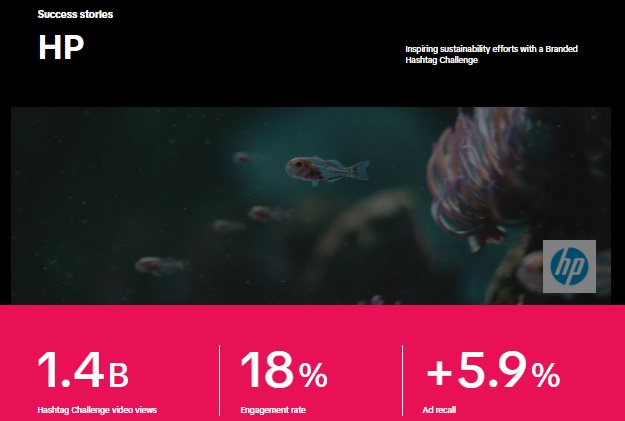
HP wanted to show its commitment to being more sustainable and reducing plastic use through the #HPRadicalReuse hashtag challenge on TikTok.
Creative Strategy
To connect with a younger audience, HP worked with TikTok creators who shared easy ways to reuse everyday items, making the message fun and relatable.
Ad Formats Used
HP used One Day Max In-Feed Ads to boost visibility, which resulted in 38 million impressions and over 36 million video views in just one day. They also used Reach & Frequency Spark Ads to keep the videos in front of users.
Audience Response
This campaign resonated with people who care about sustainability, leading to a 1.9% increase in how much they liked the brand after the campaign. HP effectively used TikTok’s creative community and ad options to promote its sustainability message.
Conclusion
Now you know how to connect TikTok account to ads manager. To get more people to know about your company, visit your site or pages, or buy from you, TikTok Ads Manager can be a wonderful tool. While it’s easy to create TikTok Ads Manager account, it can be hard to run ads and keep track of how well they’re doing. To avoid problems like getting your ad account suspended, you need to follow TikTok’s advertising rules. You can get help from First Growth Agency to set up your TikTok ads Manager account, create and run ads, and make sure they bring in good results.
FAQs
1. What is TikTok Ads Manager?
TikTok Ads Manager is a platform that allows businesses to create, manage, track, and optimize paid advertising campaigns on TikTok. It helps advertisers set campaign goals, choose target audiences, upload ad creatives, manage budgets, install tracking tools, and measure ad performance from one dashboard.
2. How do you set up TikTok Ads Manager?
To set up TikTok Ads Manager, sign up with an email address or phone number, verify your account, enter your business details, choose your country, region, time zone, and currency, add your website URL, select your industry, and set up a payment method. Once the account is approved, you can create campaigns and start running ads.
3. Do you need a TikTok account to run ads?
You do not always need a personal TikTok profile to start using TikTok Ads Manager, but having a TikTok account linked to your ad account can help with brand visibility and campaign management. Businesses usually create or connect a TikTok Business Account to run ads more professionally and access more marketing features.
4. Why is TikTok Pixel important for ads?
TikTok Pixel is important because it tracks actions users take on your website after clicking or viewing your TikTok ads. It can measure events such as page visits, sign-ups, add-to-cart actions, purchases, and form submissions. This data helps advertisers understand campaign performance and optimize ads for better results.
5. What types of TikTok ads can businesses run?
Businesses can run several types of TikTok ads, including In-Feed Video Ads, TopView Ads, Brand Takeover Ads, Branded Hashtag Challenges, and Branded Effects. In-Feed Ads are useful for traffic and conversions, while TopView and Brand Takeover Ads are better for large-scale awareness. Branded Hashtag Challenges and Effects are useful for engagement and user-generated content.
6. How much budget do you need for TikTok ads?
The budget for TikTok ads depends on your campaign goal, audience size, industry, competition, and ad format. TikTok allows advertisers to set daily or lifetime budgets. A daily budget works well for steady campaign testing, while a lifetime budget is useful when you want TikTok to spend a fixed amount over a selected campaign period.
7. How can you create successful TikTok ads?
Successful TikTok ads are short, engaging, mobile-first, and designed in a vertical video format. Businesses should use strong hooks, clear messaging, relevant hashtags, trending-style content, high-quality visuals, and a direct call to action. Testing different creatives, captions, audiences, and ad formats is also important for improving results.
8. How do you track TikTok ad performance?
You can track TikTok ad performance through TikTok Ads Manager analytics. Important metrics include impressions, clicks, click-through rate, cost per click, conversions, cost per conversion, video views, engagement, and return on ad spend. Regular monitoring helps advertisers identify what is working and make changes to improve campaign performance.